
How to Deploy Vue.js for Free on MS HOST
Easy, free deployment for Vue.js. Connect GitHub, follow this step-by-step guide, and go live in minutes on MS HOST. See also our deployment solution and FAQ for more help.
Deploying Vue.js shouldn't be complicated
Setting up servers, configuring build pipelines, and managing environment variables takes time away from building your product. MS HOST gives you a free, developer-first platform to deploy Vue.js applications from GitHub in minutes — no DevOps expertise required.
Why deploy Vue.js on MS HOST
Easy, free deployment
Connect your GitHub repo, select Vue.js, and deploy for free. MS HOST handles builds, hosting, and SSL automatically.
- No credit card required
- One-click GitHub integration
- Automatic HTTPS on every deploy
Built for modern workflows
Every push to your branch triggers an automatic build and deployment. Focus on code while MS HOST keeps your Vue.js app live.
- Continuous deployment from Git
- Live build logs in the dashboard
- Zero-downtime redeployments
Production-ready from day one
Environment variables, custom domains, and framework-specific defaults are configured for Vue.js out of the box.
- Secure environment variable management
- Framework-optimized build settings
- Instant rollback from the dashboard
Who uses MS HOST for deployment
Teams and solo developers ship Vue.js projects faster with free, reliable hosting.
Side projects and MVPs
Launch your Vue.js prototype for free and share a live URL with users or investors within minutes.
Production applications
Run real Vue.js workloads with automatic redeployments, environment secrets, and a dashboard to monitor every build.
Overview
Vue.js is an approachable, performant framework for building web UIs. MS HOST offers seamless free deployment for Vue and Nuxt projects with optimized static asset serving. This guide walks you through GitHub setup, build configuration, and going live on MS HOST.
Video Tutorial
Setup Requirements
Node.js 18v to 24v
npm, yarn, or pnpm package manager
A Vue project (Vite or Vue CLI) ready for production
Step-by-Step Deployment
Name Your Project
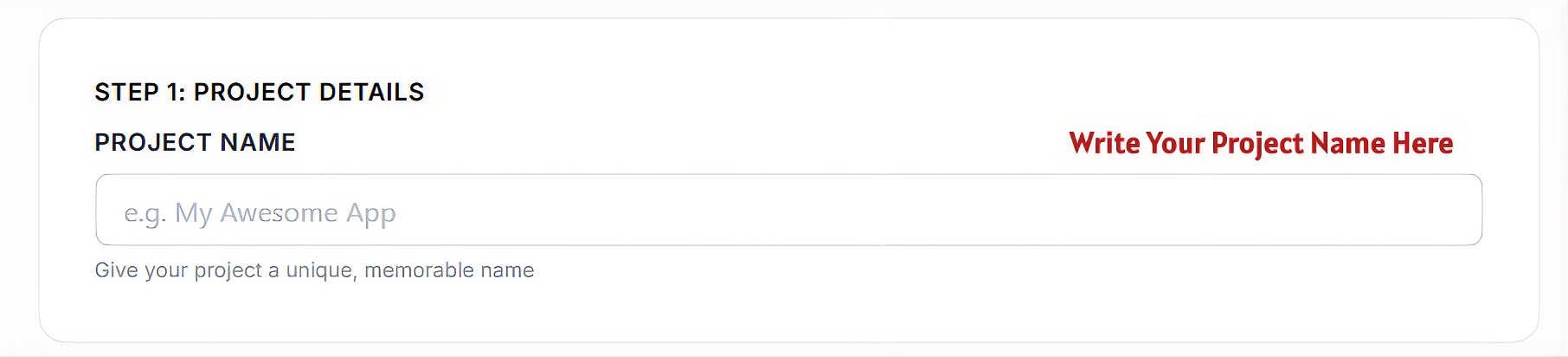
Start by entering a project name for your Vue application.
Project Name
Enter a unique name (e.g., 'Vue Inventory App'). This name identifies your project in your dashboard.
The helper text below ensures your project is uniquely named. Choose a name that makes your project easy to find later.
Connect Repository
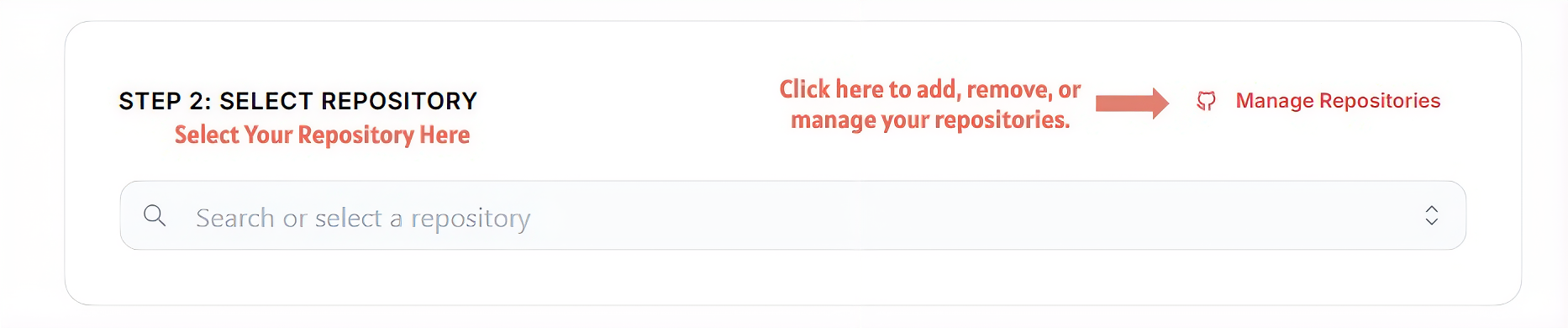
Connect your Vue source code by choosing a GitHub repository.
Search or Select a Repository
Use the dropdown to locate your Vue repository. Filtering by name makes it easy to find specific projects.
Manage Repositories
If your Vue repository is not available, click 'Manage Repositories' to authorize MS HOST to access your personal repos.
Select Framework
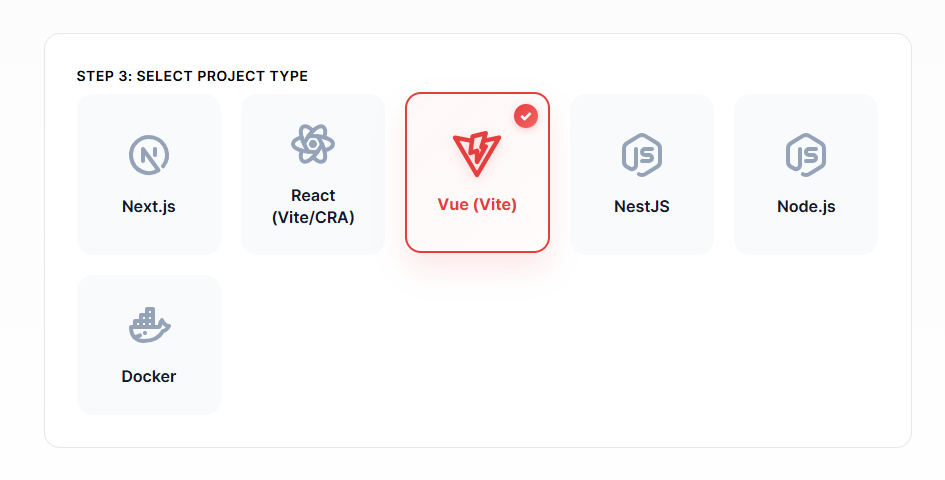
Select 'Vue.js' from the supported frameworks list to ensure the correct build process.
Vue.js
Click on the Vue.js card. A checkmark confirms your choice, and MS HOST will prepare the deployment environment specifically for Vue's build and routing requirements.
Configure & Deploy
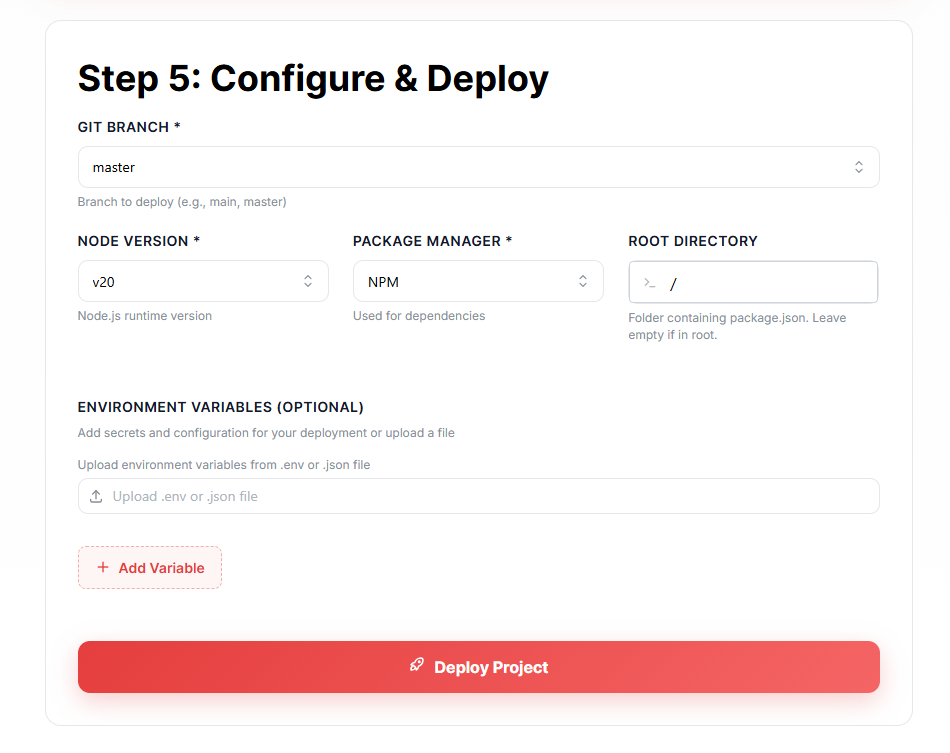
Review the build configuration for your Vue project before going live.
Git Branch
Select the branch for deployment. Every push to this branch triggers an automatic build.
Node Version
Choose the Node.js runtime version (e.g., v20). MS HOST recommends the latest LTS version for stability.
Package Manager
Select your package manager: NPM, Yarn, or PNPM. This determines how dependencies are installed during the build.
Root Directory
Specify the folder containing your package.json. Leave as '/' if your project is in the repository root. Useful for monorepo setups.
Environment Variables
Add any configuration values or secrets your Vue app needs. You can manually enter these or upload a .env file.
Deploy Project
Click 'Deploy Project' to initiate the build pipeline. MS HOST will build your Vue app and host it on our global infrastructure.
Project Dashboard Guide
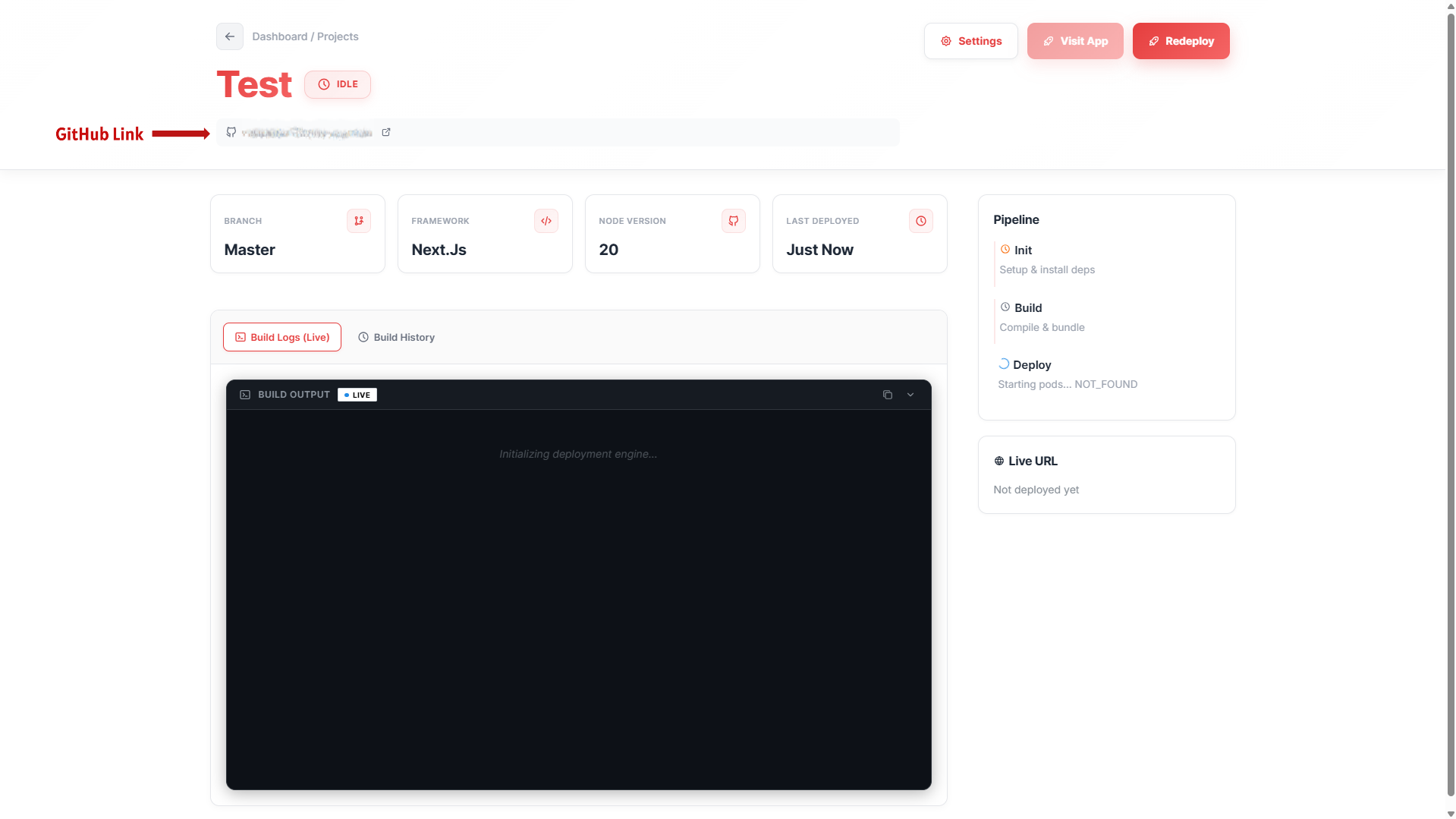
Once your project is deployed, you land on the Dashboard. This central control panel provides real-time insights and management tools for your application.
Project Name & Status
Located at the top-left, this displays your globally unique project name along with a real-time status badge (e.g., IDLE, BUILDING, LIVE, or ERROR) indicating the health of your application.
GitHub Link
Quickly access your source code. The dashboard provides a direct link to your connected GitHub repository and the specific branch currently being served.
Info Cards
Four dynamic cards give you a snapshot of your deployment: the active Branch, the selected Framework, the specific Node.js Version, and the precise time of the 'Last Deployed' successful build.
Build Logs (Live)
Watch your deployment in real-time. The integrated terminal streams live logs from our build engine, allowing you to monitor dependency installation and compilation as it happens.
Pipeline Status
Track the three critical stages of your app's journey: Init (setup & env prep), Build (source compilation), and Deploy (final orchestration and launch).
Live URL & Management
Once live, your production URL is displayed prominently. From the dashboard, you can also trigger a manual 'Redeploy' or access deep 'Settings' for advanced configurations.
Environment Variables
Manage your application secrets and configuration values. MS HOST provides a secure way to inject these into your runtime environment.
Adding Variables
Use the '+ Add Variable' button in the Configure or Settings screen to add secrets like API keys, database URIs, or internal flags manually.
Bulk Upload
Save time by uploading a `.env` or `.json` file. MS HOST will automatically parse the file and add all variables to your project in one click.
Security First
Never commit your `.env` files to GitHub. MS HOST securely encrypts all stored environment variables and injects them only during the build and runtime.
Automatic Deployment
Every change you push to your branch is automatically built and deployed. Focus on code, while we handle the distribution.
Push to Deploy
Every time you push code to your selected GitHub branch, MS HOST automatically triggers a fresh build and redeploys your application.
Zero Downtime
Our orchestration engine ensures your old version stays live until the new build is 100% healthy, providing a seamless transition with zero downtime.
Manual Redeploy
Need to trigger a build without a code push? Use the 'Redeploy' button on your dashboard to pull the latest code and rebuild immediately.
Updating Project Settings
Your project is not static. You can refine your configuration as your application grows.
Update Configuration
You can change your Node.js version, package manager, or build commands at any time from the 'Settings' tab on your project dashboard.
Project Scaling
As your project grows, you can adjust deployment resources and advanced platform settings from your project dashboard.
Tips & Common Mistakes
Vite is Recommended
Modern Vue projects are best built with Vite. MS HOST detects Vite projects automatically and uses `dist/` as the default output directory.
Set Env Vars in MS HOST Dashboard
Add your environment variables directly in the MS HOST project settings. MS HOST injects them into your build automatically.
Router Mode
Ensure your Vue Router is set to `createWebHistory()` for clean URLs. MS HOST's static hosting is optimized for modern HTML5 history routing.
Optimization
Vue CLI and Vite both handle asset optimization. Ensure `node_modules/` and build artifacts are in your `.gitignore` for faster, cleaner deployments.
Ready to deploy your Vue.js app?
Join developers using MS HOST for free, easy deployment. Connect GitHub and go live today.